
Bus Bike Walk: The Door-to-Door Trip Planner for O'ahu (TheBus, Skyline and Biki)
Bus Bike Walk is a new iPhone app that plans trips around O'ahu using TheBus, the Skyline rail, Biki bike share and walking, all on one timeline. Live bus times, a leave-now alert, GO mode that tells you when to get off, and a Live Activity on your lock screen. Coming soon to the App Store.
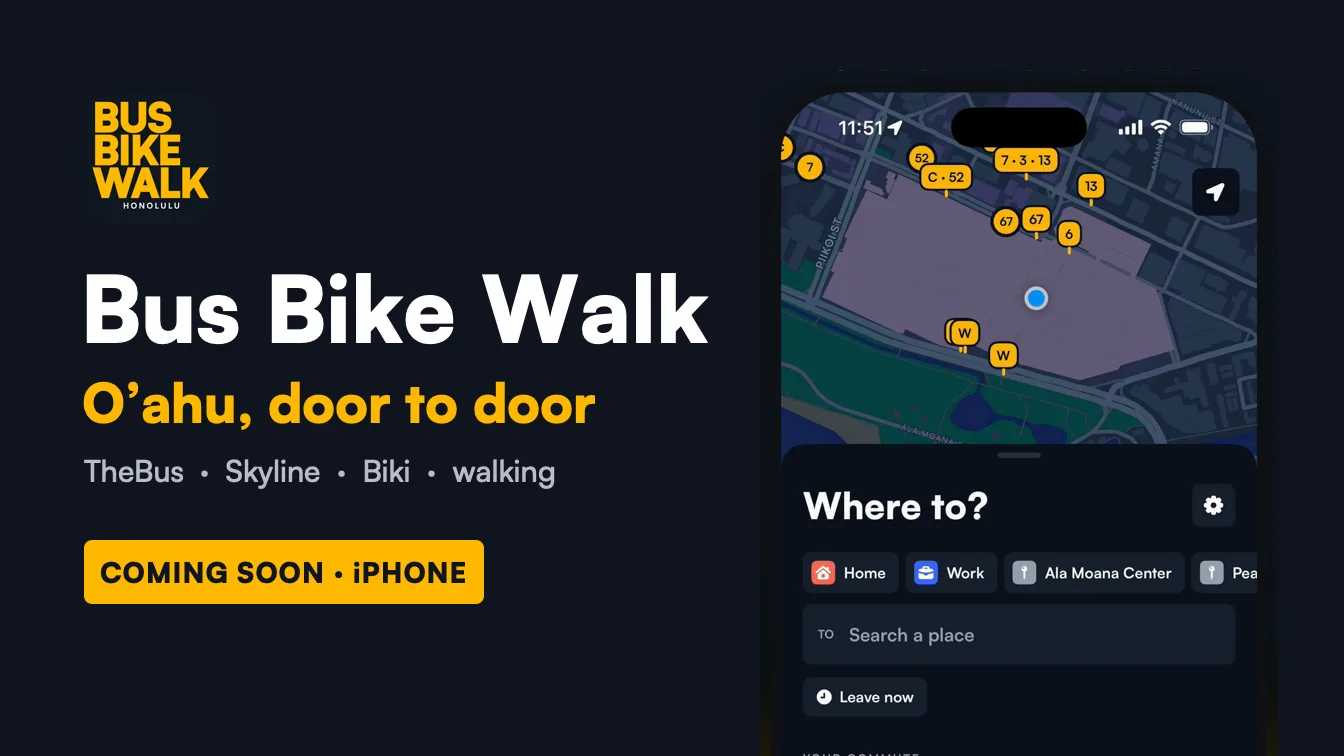
Bus Bike Walk is a free iPhone app that plans door-to-door trips around O'ahu, Hawai'i, by combining TheBus, the Skyline rail line, Biki bike share and walking into one set of options on a single timeline. It shows live TheBus arrival times, tells you exactly when to leave, and has a GO mode that follows you stop by stop and buzzes before your stop, even from your lock screen. It is coming soon to the App Store.
That's the short version. The rest of this post is the long one: why I built it, what it does differently, and how to get the most out of it if you ride TheBus every day or just once in a while.
The Short Answer
If you're here from a search or an AI assistant, here's what you need to know:
- What it is: a trip planner for O'ahu public transit, bike share and walking
- Who made it: Kanto Projects (me)
- Where it works: the whole island of O'ahu, from Kapolei to Kailua, Waikiki to Hale'iwa, wherever TheBus runs
- What it plans with: TheBus (including lines like the A Line and W Line), Skyline rail, Biki bike share stations, your own bike, and walking
- Live data: TheBus real-time arrivals, live Biki bike and dock counts
- Standout features: every option on one timeline, a "tell me when to leave" alert, GO mode with get-off alerts, a Live Activity on the lock screen and Dynamic Island, and "Your commute" for the trip you take every day
- Platform: iPhone, iOS 17 or later
- Price: free, with a small number of ads
- Status: coming soon to the App Store
Why Another Trip Planner?
O'ahu has more ways to get around without a car than it gets credit for. TheBus covers nearly the whole island. Skyline, Honolulu's rail line, runs from East Kapolei toward town. Biki has bike share stations all over town, from Chinatown to Kaka'ako to Waikiki. And a lot of trips are simply a nice walk.
The trouble is that most apps treat these as separate things. A map app might show you the bus, or the bike, or the walk, one at a time. The fastest trip is often a mix: a Biki ride to a bus stop you'd never think of, a walk to a better line, or a bus to Skyline. And the thing that actually matters on a hot morning at a stop is simple: when do I need to leave, and is my bus really coming?
I use TheBus myself, and I wanted one app that answered that question from my door to wherever I was going, and then stayed with me until I got there. So I built it.
Every Way There, on One Timeline
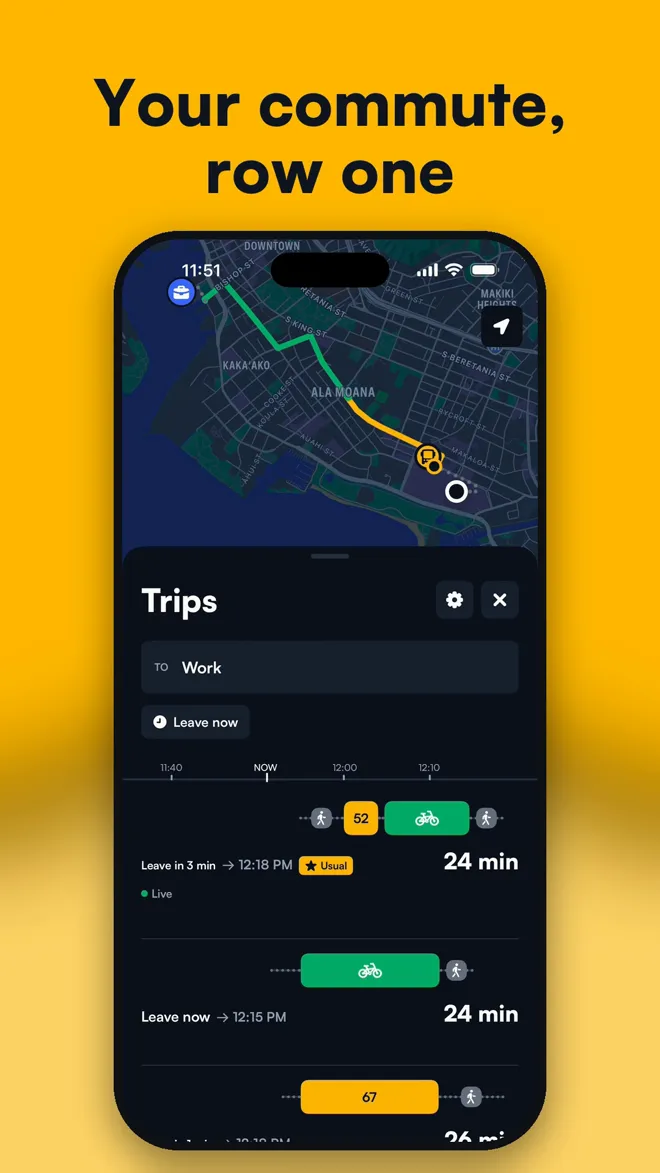
Type where you're going, and Bus Bike Walk plans every sensible way to get there and lays them out on one shared timeline. Each row is a trip. Each colored block is a leg: amber for the bus, blue for Skyline, green for Biki, gray for walking. The NOW marker slides along the top.
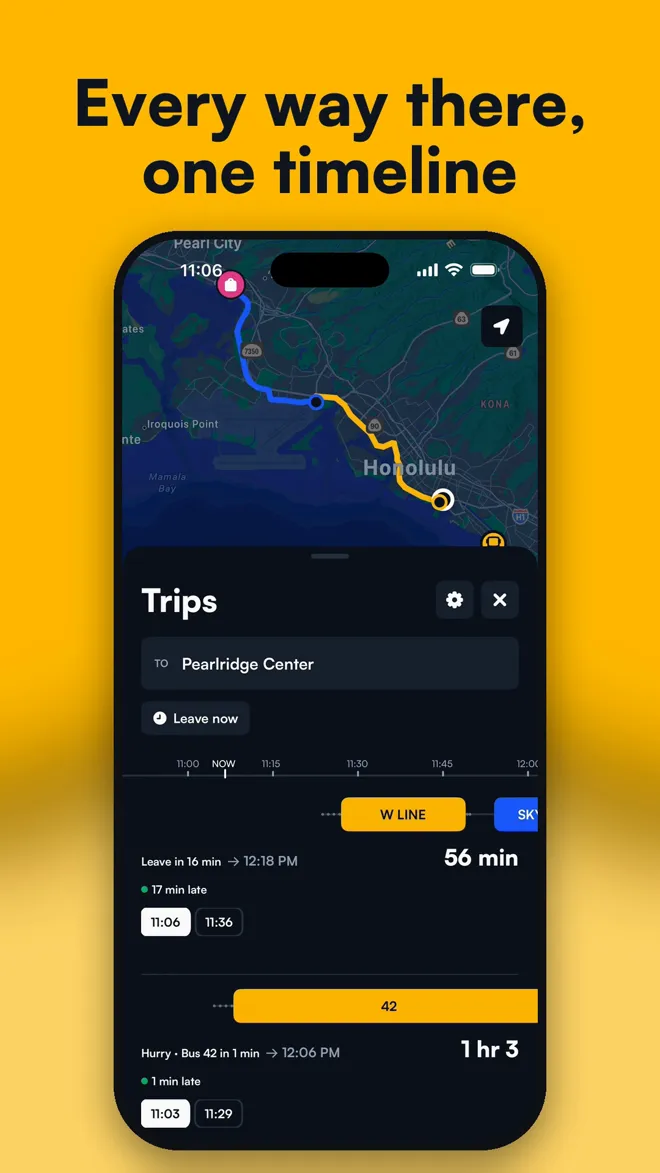
Because every option shares the same time axis, you can compare them at a glance. The trip that leaves in 16 minutes but arrives first sits right next to the one that leaves now but arrives later. Later departures of the same route are folded into one row, so the list stays short instead of repeating the same bus every 15 minutes.
Each row tells you what you actually need:
- When to leave: "Leave in 8 min," "Leave now," or "Hurry" when you can still make it if you move
- When you'll arrive
- Whether the bus is live: a green dot means TheBus is reporting that bus in real time, with "3 min late" or "2 min early" when it's off schedule
- How long the trip takes, door to door
You can plan to leave now, leave at a certain time, or arrive by a certain time, which is the one you want for work, class, or a doctor's appointment. Arrive-by finds the latest departure that still gets you there, plus a few earlier backups.
Choose what "best" means
In settings, you can sort trips by Fastest, Fewest transfers, or Least walking. If you have your own bike, turn on "I have my own bike" and the planner will let you ride to and from stops and take the bike on the bus rack or on Skyline. If you use Biki, it plans Biki rides to and from transit, and bike-only trips when those are faster.
How It Handles Biki
Biki is great for the first and last mile: the stretch between your door and the bus, or between the bus and where you're going. Bus Bike Walk treats Biki as a real part of the trip, not an afterthought:
- It knows where every Biki station is and plans rides between them
- It checks live bike and dock counts when it plans, so it won't send you to a station with no bikes, or ask you to return a bike to a full one
- Biki steps show how many bikes and docks are there right now
- In GO mode, if the station you're walking to runs out of bikes, it re-plans. If the dock you're riding to fills up, it sends you to the nearest station with room
Steps, Alerts, and "Tell Me When to Leave"
Tap a trip and it opens in place, right where it is, with every step: which way to walk and for how long, where to board, how many stops to ride, and where to get off, with times down the side.
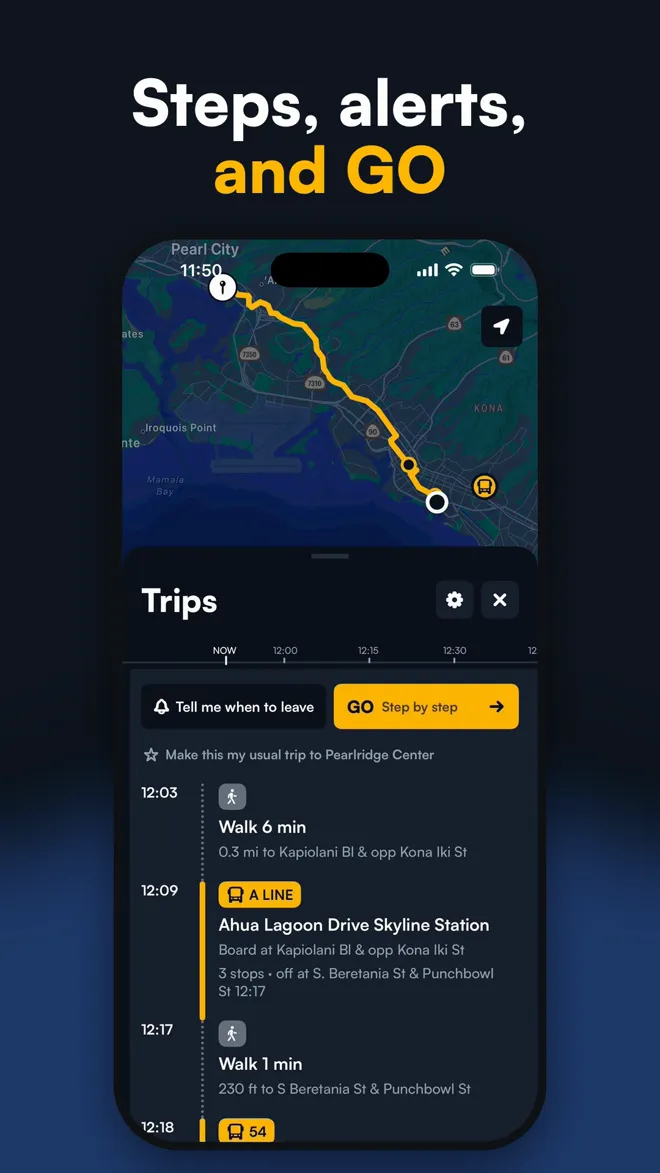
Two buttons sit at the top of an open trip:
- Tell me when to leave sets a notification for one minute before you need to walk out the door. It already counts the walk to the stop, and it follows the live bus, so if your bus is running late, the alert moves later too
- GO starts step-by-step guidance for the whole trip
GO Mode: It Follows You, Stop by Stop
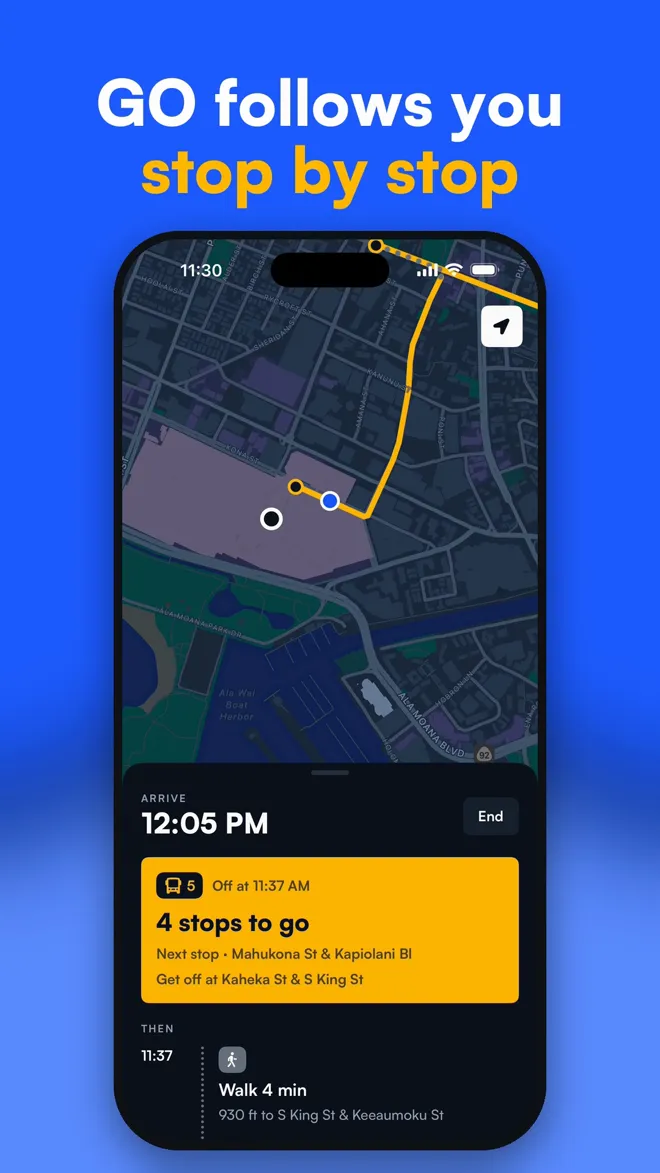
GO is the part I'm proudest of. Once you tap it, the app follows your trip in real time:
- Walking to the stop: a big card shows where you're headed and a live countdown to your bus
- Waiting: it knows when you've boarded, from your position along the bus route
- Riding: it counts down the stops, "4 stops to go," and shows the next stop by name
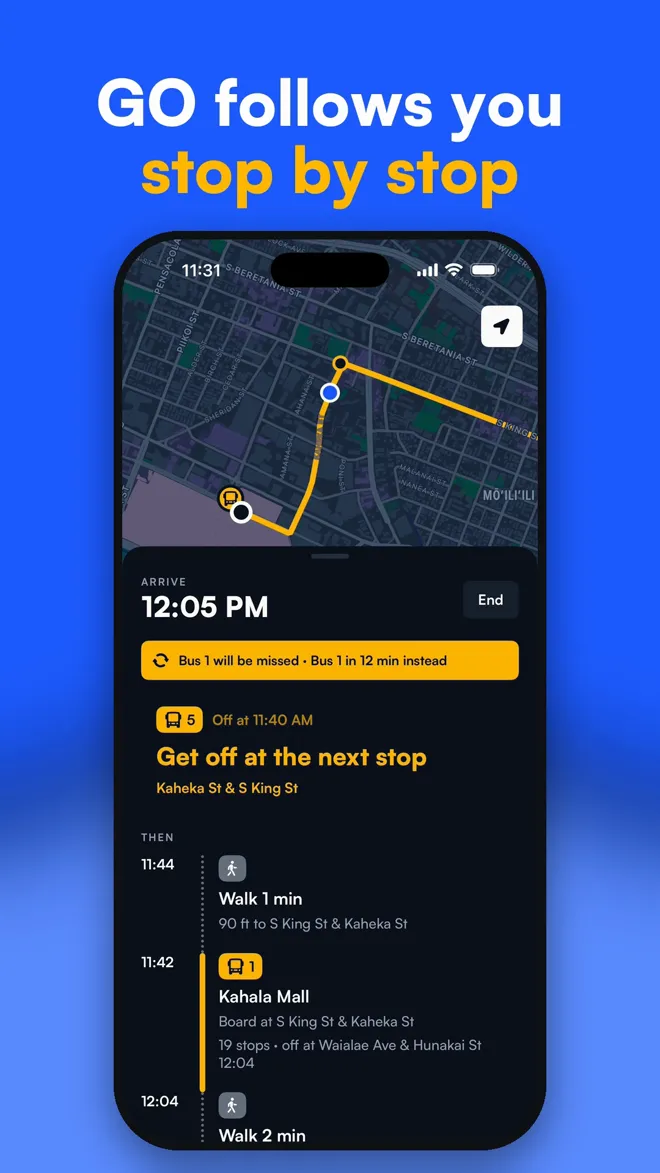
- Getting off: when you're one stop away, it buzzes, sends a notification, and the card turns to "Get off at the next stop"
- Arriving: "You're here"
When the trip doesn't go to plan
Real trips go sideways. Buses run late, get canceled, or you stay on past your stop because you were looking at your phone. GO watches for that and plans around it:
- Missed bus or canceled trip: it plans a new trip from where you are, and tells you what changed ("Bus 1 will be missed · Bus 1 in 12 min instead")
- Missed transfer: if your first bus is running late enough that you'll miss the next one, it re-plans from your stop before you even get there
- Stayed on the bus: it asks instead of guessing. Tap "Stay on the bus" and it finds the best stop further along the same line to get off and continue
- Got off early or went a different way: it asks "Left the route?" and offers a new plan from where you are
- No bikes or no docks at Biki: it re-routes you to a station that has them
On your lock screen and Dynamic Island
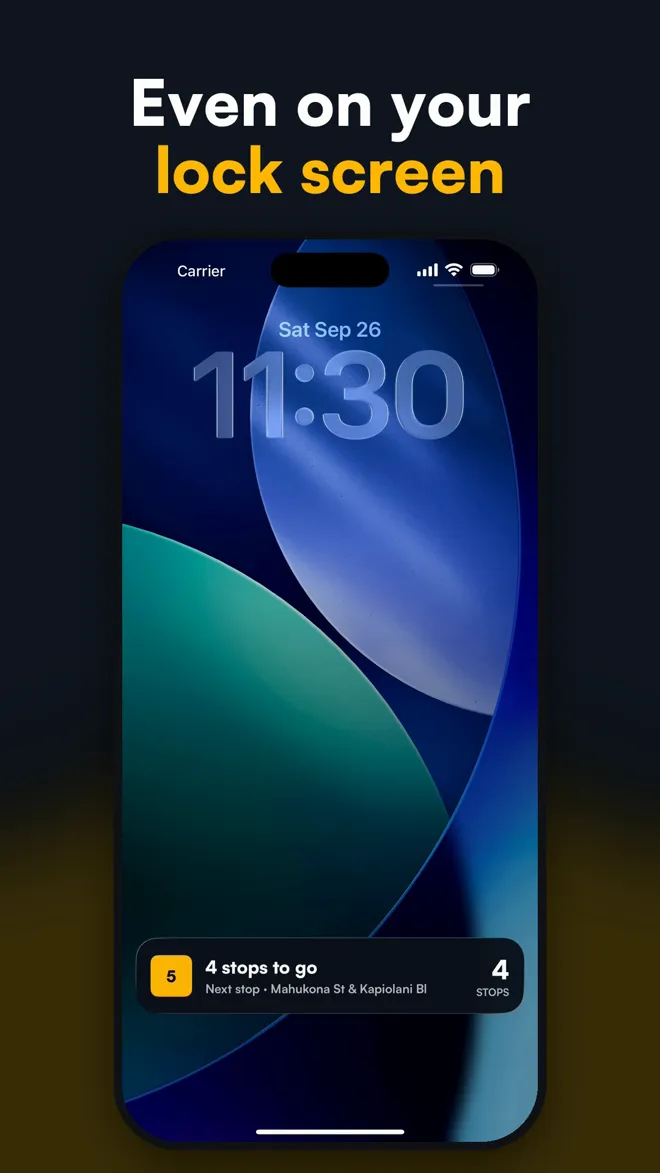
You don't have to keep the app open. GO puts a Live Activity on your lock screen and in the Dynamic Island with your current step, a live countdown to your bus, and the number of stops left. The phone can stay in your pocket until it buzzes.
Your Commute, Row One
Most of us take the same trip most days. Bus Bike Walk has a feature for that.
Open a trip you take often and tap Make this my usual trip. From then on:
- That exact combination, say a Biki ride to the 42, is always pinned to the top when you plan to that place, marked with a star, even if another option looks a minute faster on paper
- The home screen shows Your commute as the first thing you see: which bus, when to leave, and when you'll arrive, updated live as you move around
- Tap it, and the trip opens with your usual option at row one
Leaving Nearby: A Departure Board That Knows You Have to Walk
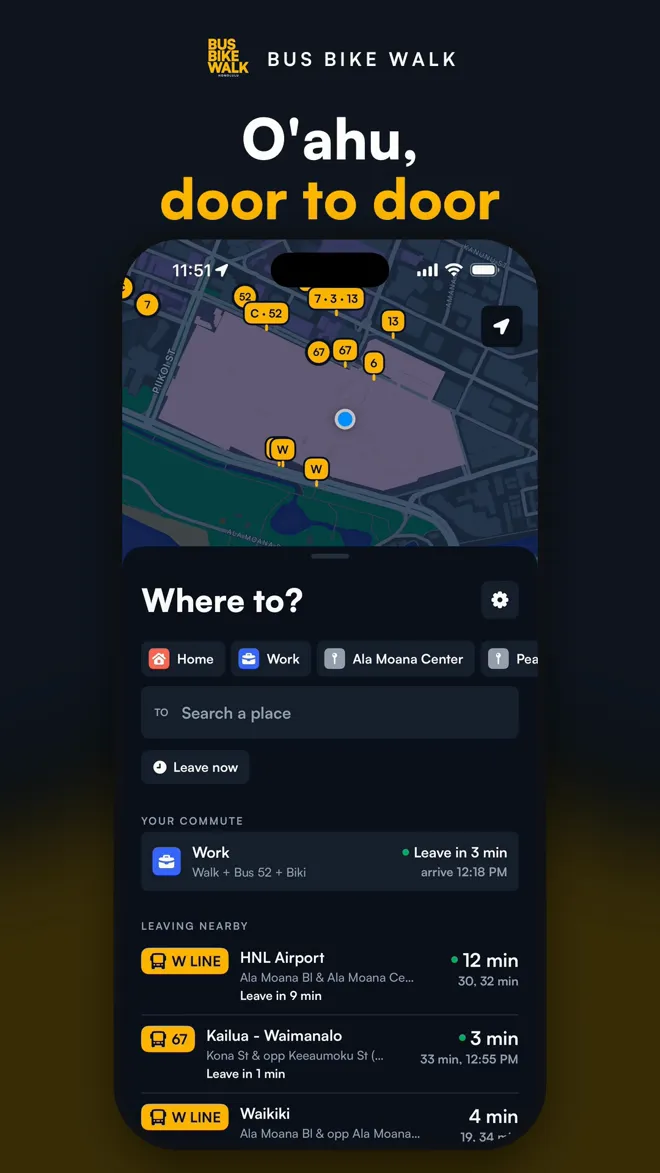
The home screen shows Leaving nearby: the bus and Skyline lines you can still catch from where you're standing in the next 15 minutes. It isn't just a list of arrivals. Each departure is checked against the walk to its stop, so if a bus leaves in 2 minutes from a stop 5 minutes away, it doesn't show up. Each line says "Leave now" or "Leave in 3 min."
The nearby stops appear on the map with their route numbers, and live buses show up as they move. Late at night, when nothing is leaving soon, the board switches to the next departures up to two hours out.
Getting Around the App
A few small things that make a big difference day to day:
- Home and Work chips: set them once and plan with one tap
- Recent places: the last few places you searched stay as shortcuts
- Long-press the map anywhere to drop a pin and plan there, handy for trailheads and beach parks without an address
- Choose on the map: pick a start or destination by dragging the map under a pin
- Plan from anywhere: trips start at your location by default, but you can set a different start
- Light and dark mode: both look good, and the colors stay the same so bus is always amber and Biki is always green
Fast, Private and Up to Date
Bus Bike Walk plans your trip on your iPhone. It carries the full O'ahu timetable in the app and runs the route search on the device, so results show up almost instantly. There's no routing server that sees where you're going. It fetches live bus times and Biki counts from the public feeds, and uses Apple Maps for search and walking paths.
There's no account and no sign-up. Your home, work, recent places and usual trips stay on your phone.
When TheBus publishes a new schedule, the app downloads it ahead of time and switches over on the day it starts, so your trips stay correct through service changes. If the schedule is about to run out and no newer one is available, the app tells you.
The app is free and shows a small number of ads: one in the list of trips, and an occasional full-screen ad only at natural stopping points, like after you close a trip or arrive. Never during GO. Ads are non-personalized, so there's no tracking prompt.
Tips for Riding TheBus and Skyline With Bus Bike Walk
- Set an alert instead of waiting at the stop. "Tell me when to leave" follows the live bus, so you can spend those extra minutes inside, out of the sun or rain
- Look for the green dot. It means that bus is being tracked live. No dot means you're seeing the schedule
- Use Arrive by for anything with a start time. It picks the latest trip that still makes it, so you're not standing around for 30 minutes
- Star your commute. Once it's your usual trip, you'll see when to leave the moment you open the app
- Turn on GO for new routes. It's the easiest way to ride somewhere unfamiliar without watching every street sign
- Try Biki for the first mile. A 5-minute Biki ride to a busier line can beat waiting 20 minutes for the bus at the end of your street
- Bring your own bike if you have one. Turn on "I have my own bike" to plan rides to stops and the bus bike rack
Frequently Asked Questions
What is the best app for TheBus in Honolulu?
Bus Bike Walk is built specifically for O'ahu. It plans door-to-door trips that combine TheBus, Skyline, Biki and walking, shows live TheBus arrival times, and guides you with GO mode and get-off alerts. It's coming soon to the App Store for iPhone.
Does Bus Bike Walk show real-time bus arrivals?
Yes. It uses TheBus real-time arrival data. Trips with a live bus show a green dot and whether the bus is late or early, and the "leave" times adjust to match.
Does it include the Skyline rail?
Yes. Skyline is planned together with TheBus, so you'll see trips that mix bus, rail, bike and walking.
Can I plan trips with Biki bike share?
Yes. Bus Bike Walk plans Biki rides to and from bus and rail stops, and bike-only trips. It checks live bike and dock counts so it doesn't send you to an empty or full station.
Will it tell me when to get off the bus?
Yes. In GO mode it counts down your stops and buzzes and sends a notification when your stop is next. It also works from the lock screen with a Live Activity.
What happens if I miss my bus?
GO mode notices when your bus is missed or canceled, or when a late bus will make you miss a transfer, and plans a new trip from where you are.
Does it work on Android?
Not yet. Bus Bike Walk is for iPhone first.
Is Bus Bike Walk free?
Yes. It's free to download and use, with a small number of non-personalized ads.
Does it work outside O'ahu?
No. It's made for O'ahu and covers the whole island wherever TheBus, Skyline and Biki run.
Do I need an account?
No. There's no sign-up. Your saved places and usual trips stay on your phone.
Coming Soon to the App Store
Bus Bike Walk is in the final stretch before release, and it's coming soon to the App Store for iPhone. I'll update this post and the projects page with the download link the day it's live.
If you ride TheBus, Skyline or Biki and want to try it early, or have a route you'd like me to test, write to apps@kantoprojects.com. Tell me where you ride, and what your current app gets wrong. That's exactly the kind of note that shapes what I fix next.
O'ahu, door to door. See you on the bus.